Tap it, and it gets fixed.
Tap to Fix is a free Claude Code plugin. The people who review your website tap the spot on any device, including their phone, and say what to fix. Claude fixes it and tells them when it's done.
By Ben Pellow
/plugin marketplace add workingBen/tap-to-fix
It used to come by text message
My wife reviews my websites, and like most people she finds problems on her phone, on the live site, whenever she happens to be looking. For a long time she sent them the way most people do: a screenshot, then a text saying what looked wrong. Then another screenshot. Then another.
I passed each one along to Claude by hand. I copied and pasted her screenshots and messages straight into Claude. The most important part, context, got lost somewhere between her phone and my AI. I was the bottleneck.
Now she taps the spot
Tap to Fix replaces the text message. Each reviewer gets a private link. It opens the real website on their phone, and when they tap Comment they can tap the spot that looks wrong and type what should change. That's all. They don't need an app, an account or a password. The comment saves with a screenshot of exactly what they saw and a note of exactly which part of the page they tapped, so it can still be found after the page changes. Ordinary visitors to the site never see any of it.
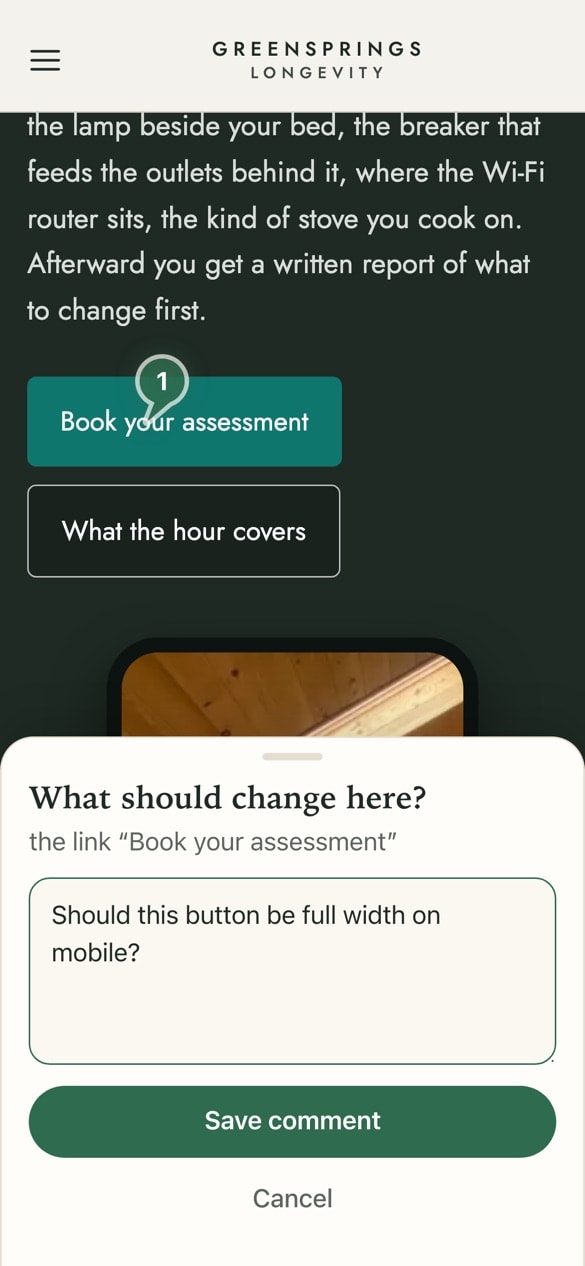
My reviewers are family and friends, mostly on phones, so it's built for them: large type, plain words, nothing that looks like developer tooling.
On my side, a dashboard shows who has comments waiting. Tap to Fix has commands, but I just ask Claude Code in plain English: “Run a review cycle for Alexis's open Tap to Fix comments.” (Claude Code reads and changes the code on my computer.) It downloads her comments and screenshots and works through them one at a time. A little later I have a dozen fixes waiting for my approval, each with before and after screenshots.

Then the reviewer hears back. Every comment's status shows up on their list: fixed, saved for later, or kept as is, with a one-line note when I decide not to change something. They know what happened without having to ask me.

From one tap to a finished fix
The video above follows one comment from start to finish. The reviewer, Alexis in the demo, is on our Virtual EMF Assessment page, looking at a still photo of a bedroom. She taps the photo and types:
Can this be a slow video around the room?
That isn't a bug report. It's an idea, and an idea rarely survives a text message and my retelling of it. Claude turned the photo into a slow tour of the room, labeling each source as it passes: the bedside lamp, the outlet behind the bed, the wall wiring, a cell tower, the neighbor's smart meter. I checked it, and merged it.
That idea came from a real first batch of 19 comments on our virtual assessment pages. Eighteen are fixed, and one is deferred until we get the right photography.
I've been building developer tools and review tools professionally for a decade. This is the best review tool I've ever seen. It cut the effort of giving me feedback enormously. People just touch the screen and say what they think.
A new kind of stress
About a year ago, I hit a wall. On an average day I run four or five AI agents at once. (An agent is an AI that works on its own for long stretches, writing code while I do something else.) I'm working closely with one or two of them, and two or three more are slowly making progress on something else. They work far faster than any person, and they never stop talking, in giant streams of terminal text.
One day I told my wife, "There is this brand new kind of stress in the world. I don't even know if it has a name yet." It's the pressure of your agents needing you all the time. A question is buried somewhere up the screen. Another ping comes in. I had notifications on for every single question, because I wanted to answer right away so they'd keep working.
That day I shut them all down and took three or four days completely off. No agents. I still do that now and then.
Then I started building tools to change how we talk. Proofs came first. My agents stopped interrupting me: every question waits at the top of a page, with buttons to answer. Tap to Fix takes the same idea outward, to everyone who reviews my work. Feedback used to have to come through me, in real time. Now it waits in a queue, with its screenshot, until I'm ready. No one blocks on anything. Host Headroom came last: it finds the mess my agents leave on my laptop and long-running hosts, and tells me what to clear.
Now I get to bring in the firewood, sit by the fire and drink my coffee. My agents keep running. It's not stressful. It feels good.
Try it
If you build websites with Claude Code, you can run your own copy for free in a few minutes. You need Claude Code, Node 22.13 or newer, and a free Cloudflare account. Tap to Fix uses Proofs for its review cycle, so install both:
/plugin marketplace add workingBen/proofs /plugin install proofs@proofs /plugin marketplace add workingBen/tap-to-fix /plugin install tap-to-fix@tap-to-fix
Then run /tap-to-fix:setup. It creates one database, one storage bucket and one Worker (a small program that runs on Cloudflare) on your own account, and nothing else. It hands you one line to add to your site and your private owner link. Add a reviewer, give them some pages, and text them their link.
Everything stays on your account. There is no hosted service, so I never see your comments or your reviewers. Screenshots have no public address: only you and the reviewer who took one can open them. It works with any website, whatever it's built with.
See the Tap to Fix site View on GitHub
Tap to Fix is free and open source (MIT), built for Greensprings Longevity. It is an independent project. It is not made, sponsored or endorsed by Anthropic.